![realbuzz_primary_rgb (10).png]](https://knowledge.realbuzz.com/hs-fs/hubfs/Logos/realbuzz_primary_rgb%20(10).png?height=40&name=realbuzz_primary_rgb%20(10).png)
It's easy to get started with listing your third-party event (not currently partnered with realbuzz).
First of all, you need to purchase a package. Visit the realbuzz Charity Console and navigate to the Non-Partner Events section, where you'll see an Activation area. From here you can choose your package and purchase directly through the Console. You'll need to read and accept the terms and conditions to proceed.
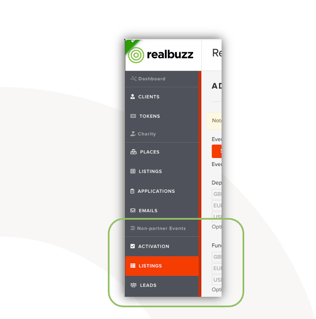
If you do not wish to pay by card or Apple Pay / Google Pay, you can request an order with your realbuzz Account Manager and they'll issue you an advertising agreement and a subsequent invoice.
Getting set up
Once you've secured your package, you can start listing your charity for non-partner events. You'll be able to list the amount of events available in the package you chose but don't worry you can always upgrade.
- Navigate to the Non-Partner Events section again, but this time choose 'Listings'
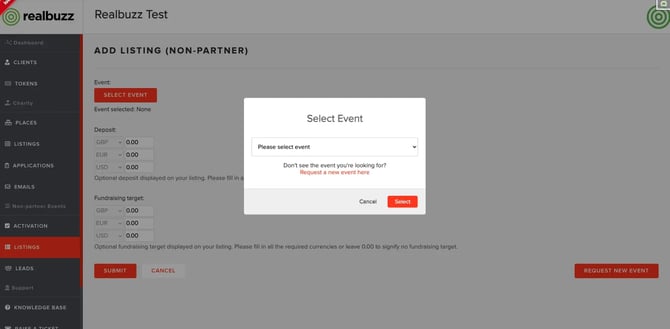
- Hit the 'Select Event' button to get started. If your event is already available, you can select it from the list. If your event is not currently available, you can easily start set up by selecting 'Request new event'.
- When setting up a new event, you'll be asked to include event information: event name, event date and year and the website URL for the event.
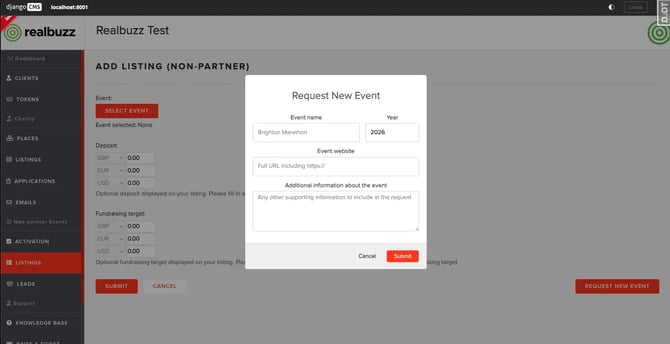
- Once your event has been requested, it'll be sent to our dedicated Charity Support Team to set up and you'll be notified when it's ready.
- Either way, once you've selected your event or your new event is set up, you'll need to add your listing information. The information about your charity (logo and bio) is already stored and will pull through automatically but you will need to add information if there is a deposit that will eventually be payable by the runner and any expected fundraising minimum.
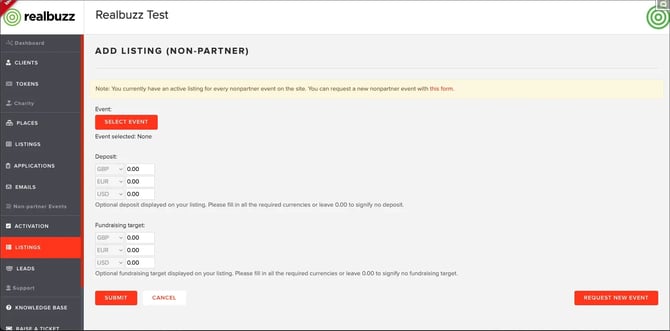
- To add this information, please note you will need to include it in £, € and $. This is because the realbuzz website accommodates all three of these currencies for a user. If there is no deposit payable or no fundraising minimum, please leave all fields as 0.00.
- Hit 'Submit' to save your listing. You can deactivate a listing against a non-partner event at any time, just use the '...' menu.
What happens if I use all the listings available in my package?
If you go list your charity on a non-partner event but you don't have any listings remaining, the system will prompt you to upgrade and purchase more listings.
I want more exposure for my charity on a non-partner event, what can I do?
For an additional fee, you can boost your listing across all the non-partner events applicable for a period of one month to ensure your listing is featured in the top section of the page. You can choose this option in the 'Activation' section of the Non-Partner Events area. Subject to availability.
Visit the realbuzz Charity Console today or speak to your dedicated Account Manager for more information.